Hodman AI - coding agent for non-programmers

Hodman helps non-programmers to create|

Start from zero or bring your current codebase. Hodman can import a ZIP, connect to Git, work across repositories, deploy the project and keep improving it in production.

How to

What would you like to do with your website?

A few small things you can ask Hodman to do. These examples use Sunday Studio, a fictional pottery workshop website.

Add a booking form and a private admin area

Ask for a form, then submit a test request. Open the admin area on the same site, change the request’s status and refresh to check it was saved. The form, admin pages and booking data belong to your project.

Try asking

Add a workshop booking form and a password-protected admin area where I can review requests and update their status.
Hand over several changes at once

Put the changes into project tasks and approve the ones that are ready. The agent works through the queue while you review the results in preview. This demo adds a FAQ, a workshop guide and a clearer booking confirmation.

Try asking

Create backlog tasks for a visitor FAQ, a short workshop preparation guide and a clearer booking confirmation. I’ll approve which ones to start.

Show the change on a screenshot

Take a screenshot, mark the button or image you want changed and send it in the chat. Check the updated page in preview. You can point to the part you mean without knowing its name in the code.

Try asking

Make the marked button dark green and give the photo 16 px rounded corners. Keep the rest of the page unchanged.

Create an image and put it on your page

Describe an image in the chat. Ask for a change to the result, then have Hodman put the version you like on your website. In the studio demo, we kept the vase and changed its background before adding it to the page.

Try asking

Keep this vase, change the background to sage green and add a eucalyptus branch. Then use the edited image on the homepage.

Get a report at a time you choose

Tell the agent what to check and set a schedule. Each run creates a task with its own report. Open it from the run history to read the results. The studio example checks page views, button clicks and bookings using demonstration data.

Try asking

Tomorrow at 09:00 UTC, report yesterday’s page views, button clicks and bookings. Leave the report in the task and do not change the site.

Stop repeating your business brief

Ask Hodman to remember your audience and tone in project knowledge. In a new task, ask it to use those notes. You can review and update the saved context as your business changes.

Try asking

Remember that our workshops welcome complete beginners and use a calm, friendly tone. Save this in project knowledge for future writing tasks.

What comes with Hodman

Technical decisions are already part of the service.

Hodman is focused on web applications. Preview, publishing, project runtime, Postgres and working technical defaults come with the workspace. On hosted plans, there is no separate server or cloud account to configure for each app.

Choose the model for each task and use a supported AI subscription or your own API key. Hodman bills for the workspace service; optional platform Credits can fund supported models. The workspace plan and AI usage are separate.

The agent keeps project context

Your coding agent becomes an AI teammate.

Hodman keeps project memory and a working model of what matters to you. The agent can use documents, web research and visual tools while it builds and improves the application.

Read documents, including PDFs

Search the web and collect references

Generate and edit images

Remember decisions, priorities and project context

The builder has the project around it.

Start with a prompt

Describe an internal tool, landing page, automation or SaaS product. The agent creates the application and gets it running.

Bring existing code

Connect a Git repository or upload a ZIP. The agent reads the project structure and works inside the codebase you brought.

Run in an isolated environment

Each project gets an environment for its code, services and commands. Paid plans can keep applications running for your team.

Postgres included

Every hosted project can use its own Postgres database. Add project-owned integrations when the application needs external data or actions.

Preview before release

Open the working preview, ask for changes and check the result in the same project conversation.

Publish a working link

Release the version you approved and share the application with the people who need to use it.

Run, fix and validate in one workflow

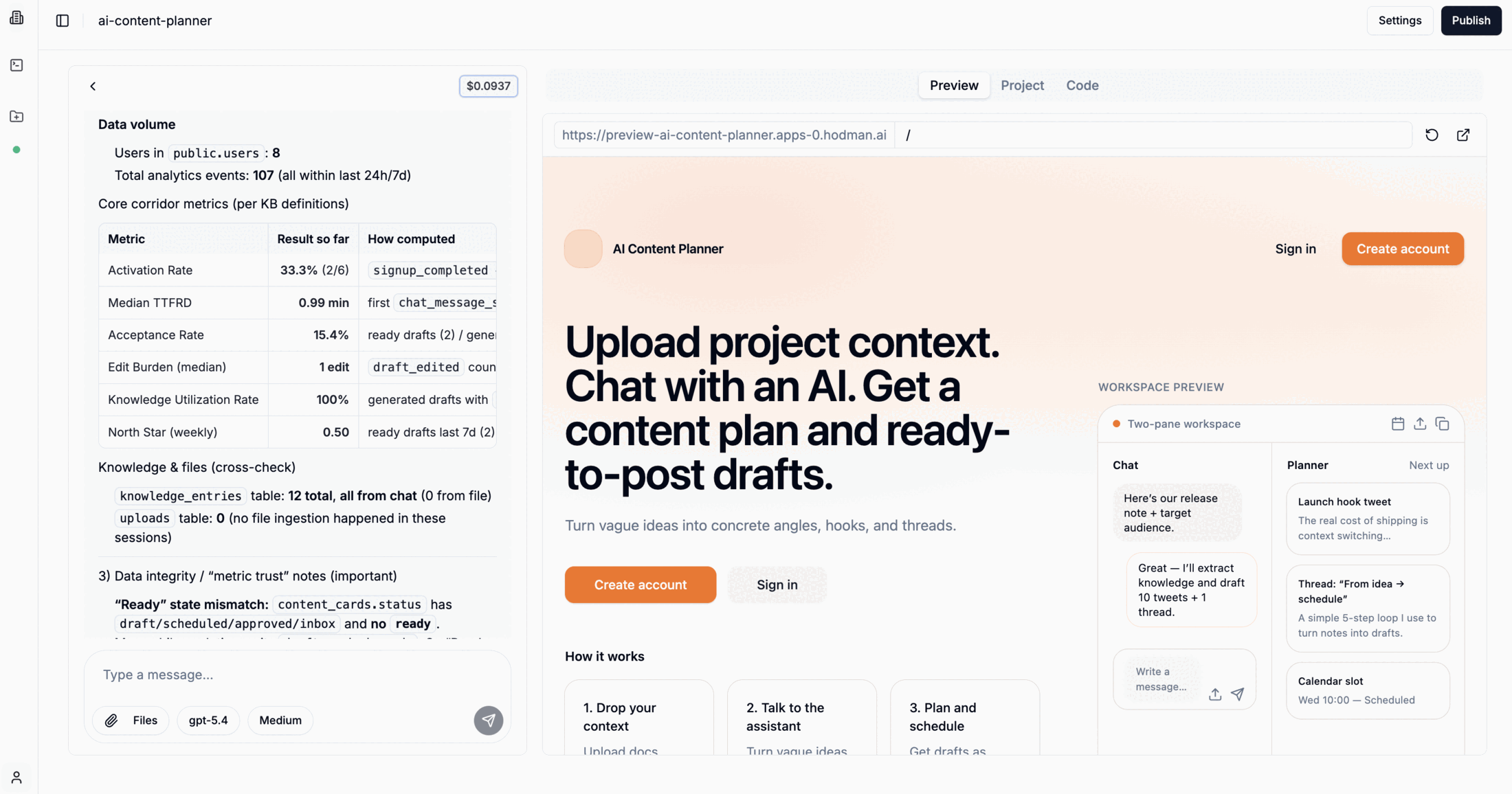
Preview before launch, publish when ready, and ask Hodman questions to understand what is happening in your product.

Hodman analytics dashboard for a running application

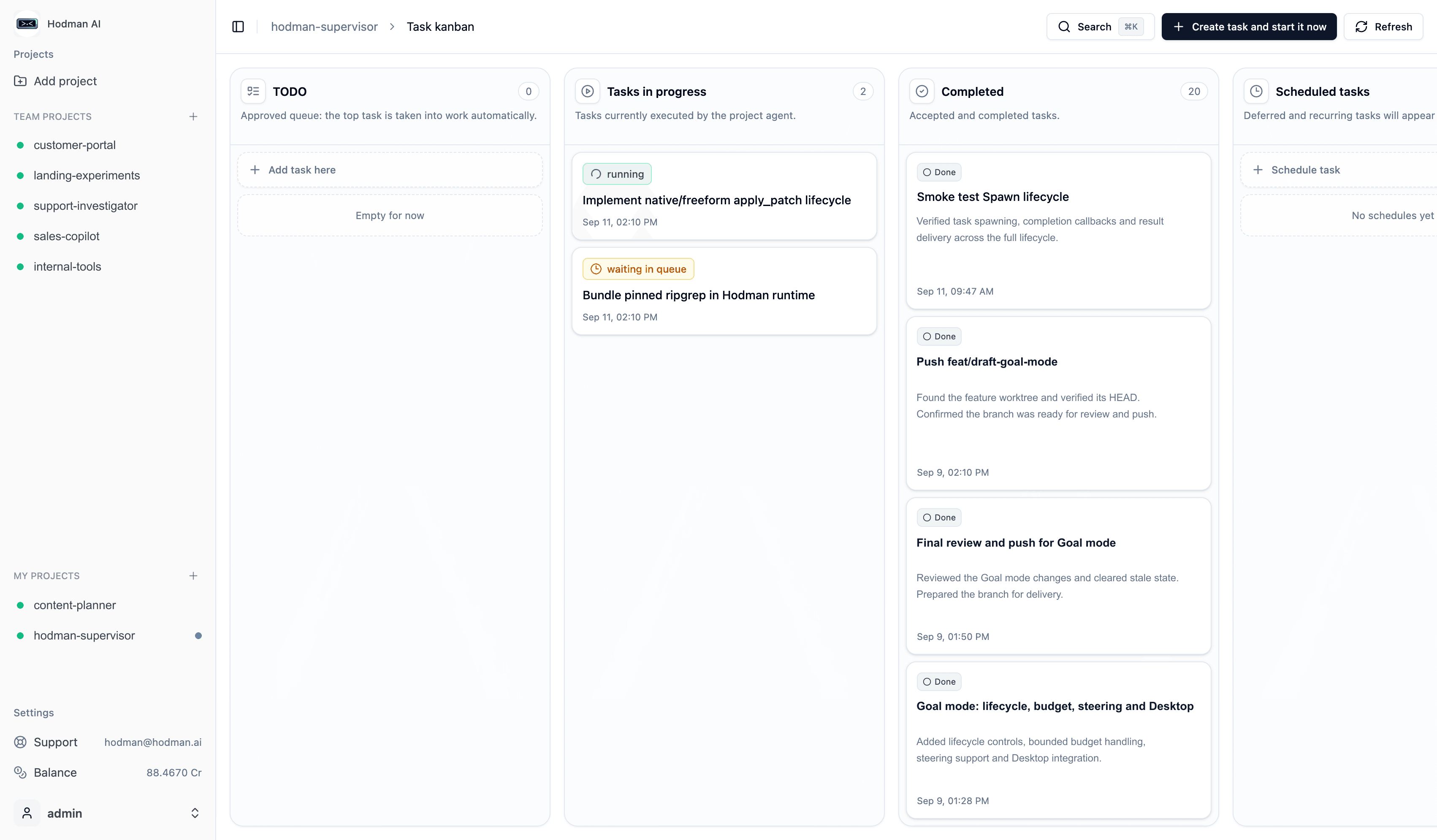
Project tasks have their own Kanban.

Keep requests, background work and completed results beside the application. The project agent can take ready tasks, delegate focused work and bring the result back for review.

Hodman project Kanban with running, queued and completed agent tasks

What you can build

Start from a business problem and ship a working first version.

Hodman has the runtime, data layer and agent workflow for common business web-app jobs.

Clickable prototypes

Replace static mockups with working flows you can test with users before assigning a full implementation team.

Landing pages

Launch a campaign page, add forms and track conversion without waiting for an agency cycle.

API-first applications

Create applications with a backend, database, OpenAPI contracts and real UI states.

Chatbots and assistants

Build assistants with knowledge, actions, data and a useful interface around the conversation.

Personal and team tools

Turn a spreadsheet, manual workflow or team process into a custom internal web tool.

SaaS products

Build a product with authentication, application workflows and a path to paid accounts.

Build the first useful version.

Start with one application and keep its code, runtime, data and agent together as the work continues.